Text messages for court: a complete SMS record from Android
Courts, insurers, employers and official bodies want the messages as they are: who wrote what, when, in order, with nothing left out. Screenshots give fragments. 2doc builds one document from the whole thread for the period you choose, on your phone, and you decide who receives it.

Why screenshots fall short
A screenshot shows a screen, not a conversation. Most messages carry no date, the context above and below is cut off, and a set of screenshots can be reordered or thinned out without anyone noticing. Whoever reads them has to trust the selection.
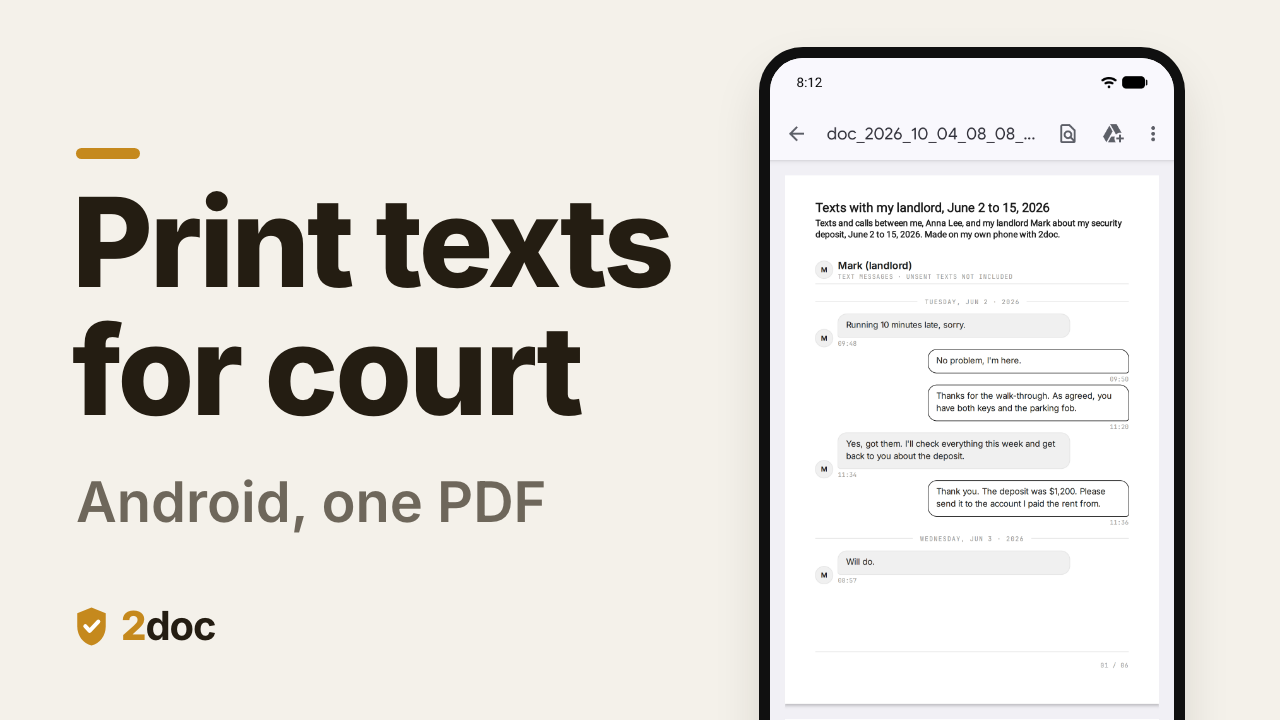
A record made from the phone's message store is different. It covers the whole period, every message has its day and time, both sides are there, and page numbers show whether a page is missing.
What the record contains
- The thread under the name your phone has for the contact, for the period you set, with nothing skipped inside it.
- A date line for every day and the time on every message.
- Your messages and theirs on their own sides.
- MMS photos and attachments in place, if you include them.
- Page numbers on every page.
- If you add them: the call log for the same period, and a title or a note saying what the document is and who prepared it, each as its own section of the same PDF.

Build the record
- Open 2doc and tap Create Document.
- Add a Title section and, if useful, a Note saying what the document is, whose phone it comes from and which period it covers.
- Add a Messages section, select the conversation, and set a Custom period with the exact start and end dates. Under the period, 2doc shows how many of the conversation's messages fall inside it. Custom is Pro, a one-time purchase, even for a short range. Free covers Today and 7 days.
- Add a Call Log section for the same period if calls matter to the case.
- Tap Generate Document and read it through once on the phone.
- Hand it over: Print it, Share it by email, or Share protected to send a password-protected copy and give the password separately.
The step-by-step for each source: text messages, WhatsApp, Telegram, call log.


Keep the original
The PDF is a rendering. The messages on the phone are the source, so keep them: do not delete the thread, and do not let a change of phone erase it. 2doc's free Backup & Restore saves SMS, MMS and the call log to a standard XML file on the phone, with an optional password, and restores them on the same phone or a new one. A backup you copy to your own cloud or computer survives the phone.
If someone asks how the document was made, the answer is short: 2doc read the phone's own message store and laid it out. It changed nothing and it uploaded nothing.

What can be missing
A document that looks complete but is not is the worst outcome, so know these limits before you rely on the record. Apps that are not your default SMS app do not see everything:
- Internet chats (RCS "chat features") are not SMS and can show up only partly, or not at all. Texts sent as plain SMS always do.
- Blocked or spam-filtered senders can be kept only in your SMS app's own folders.
- Texts you wrote that never went out (not sent, sending, or a draft) are visible only to your SMS app. The PDF's header says so: "unsent texts not included".
- Texts deleted in your SMS app, including auto-deleted verification codes, are gone from the phone for every app.
- On newer Android versions the system holds back conversations it has flagged, for every app that is not the default SMS app. 2doc can become the default SMS app for a moment to include them, and reminds you to switch your usual app back.
Check the thread in your messaging app against the PDF for the same days. Where the app shows "chat" messages that the PDF does not, those are RCS, and they need that app's own tools.
Print text messages for court
Tap Print in the finished document. Android's print dialog offers your printer or Save as PDF. Print a page range if only part is wanted, and keep the full document too. 2doc hands the file only to the print service you pick.
Not legal advice
Whether a document is accepted, and how it must be presented or sworn, is for the court or body and your adviser to decide, and it differs by country. 2doc gives you a complete, readable record of what is on your phone. It does not certify or authenticate anything.
Questions
Is a 2doc PDF a certified or forensic export?
No. It is a faithful rendering of the phone's message store, made on the phone. A forensic extraction is a specialist's job. The PDF is what you can produce yourself today, and the phone stays the primary source.
Can WhatsApp and Telegram messages go into the same record?
Yes. Add WhatsApp and Telegram sections to the same document, each with its own period. Several message conversations in one document is a Pro feature.
Can I show only the relevant days?
Yes. Set a Custom period, and say so in the title or note, so the reader knows the range was chosen and can ask for more.
Does the recipient need 2doc?
No. It is a regular PDF that opens anywhere. A password-protected copy needs only the password.
Can I mark the document?
Yes. Stamp a watermark on it, for example a case reference. Watermarking permanently changes that document's file, so share any unmarked copy you need first.